- For ASC providers, type the preferred provider number in the Override OP ASC Provider Number field.
- For Inpatient Per Diem Providers, type the preferred inpatient per diem provider number in the Override Inpatient Per Diem Provider Number field.
- For all other providers, type the preferred provider number in the Override Provider Number field.
All of the remaining fields are required.
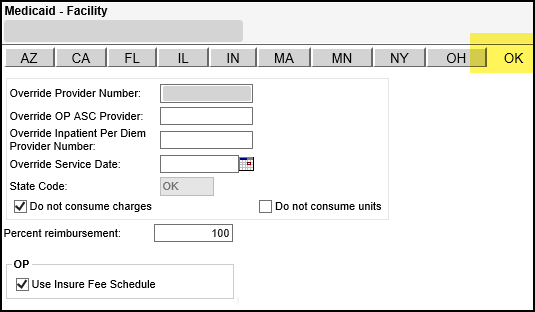
Note: Refer to the contract to determine the options to select and the values to enter.
 Field Descriptions
The following table describes the fields on the OK tab of the Medicaid - Facility reimbursement tool.
Field | Description |
Do not consume charges | Provides the option not to consume charges. This is used for contract carve outs. |
Do not consume units | Provides the option not to consume units. This is used for contract carve outs. |
Override Inpatient Per Diem Provider Number | Preferred inpatient per diem provider number. Up to ten numeric digits. |
Override OP ASC Provider | Preferred Outpatient ASC provider number. Up to ten alphanumeric digits. |
Override Provider Number | Preferred provider number. Up to ten alphanumeric digits. |
Override Service Date | Preferred service date. Use MM/DD/YYYY format. Overrides the service date on the claim with the date you enter. You may use the anchor date instead of this option. |
Percent Reimbursement | Three digit percentage amount. |
State Code | This field defaults to OK, and it cannot be changed. |
Use Insure Fee Schedule | This default for this check box is unchecked. When unchecked, OP claims process using FFS fee schedule. When checked, OP claims process using Insure Fee Schedule. |